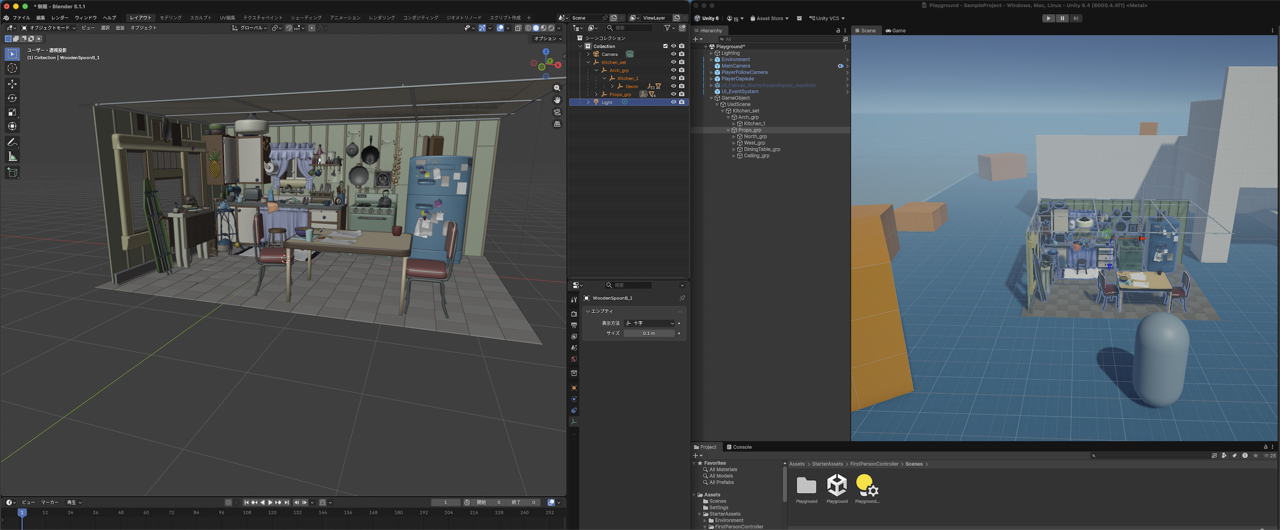
unity-usd-stagecraft-docs

USD Stagecraft

Load OpenUSD (.usd / .usda / .usdc / .usdz) files at runtime in Unity, preview them in the Editor without Play mode, and iterate with file watching and diff reload.

Version: 0.1.2 (Early Access)
Publisher: ZenithGateStudios


Table of contents

  1. Supported environments
  2. File formats and paths
  3. Installation
  4. Quick start — Editor preview
  5. Quick start — Runtime (samples)
  6. Core concepts
  7. Workflows
  8. Features (summary)
  9. Component and API reference
  10. Render pipelines and shaders
  11. Roadmap
  12. macOS security notice
  13. Known limitations (Early Access)
  14. Troubleshooting
  15. Support and documentation
  16. License

Supported environments

Item Details
Unity 2022.3 LTS or later
macOS Apple Silicon (M1 / M2 / M3) — arm64 only
Windows Planned for v1.0 (see Roadmap)
Render pipelines Built-in RP and URP (primary targets; see Render pipelines and shaders)

Note: Intel Mac (x86_64) is not supported in this Early Access release. Broader macOS support is planned for v0.2.0.


File formats and paths


Installation

  1. Open Window → Package Manager in Unity.
  2. Set the package source to My Assets.
  3. Select USD Stagecraft, then Download and Import.
  4. Confirm the package appears under Packages/com.zenithgatestudios.usd-stagecraft/ in your project.

Import samples (optional)

  1. In Package Manager, select USD Stagecraft.
  2. Expand Samples and import Basic Load and/or Stage Preview.

After import, sample assets live under:

Assets/Samples/USD Stagecraft/<package-version>/<SampleName>/

where <package-version> matches this package’s version (for example 0.1.2).

From a local package folder (developers)

  1. Open Window → Package Manager.
  2. Click +Add package from disk…
  3. Select package.json from the extracted package folder.

Quick start — Editor preview

Goal: see a USD stage in the Scene view without pressing Play.

  1. Add an empty GameObject (or use the Stage Preview sample scene — menu USD Stagecraft → Create Stage Preview Sample Scene after importing that sample).
  2. Add the UsdStagePreview component.
  3. Set File Path to a valid USD file (absolute path, or use StagePreviewSample with a file name under StreamingAssets/).
  4. The hierarchy appears under the GameObject; in Edit mode, generated objects use HideFlags so they are not saved into the scene file (preview only).

Changing File Path, Shader Name, or Scale in the Inspector reloads the preview in the Editor.


Quick start — Runtime samples

Basic Load

  1. Import the Basic Load sample.
  2. Copy sample.usda (and optionally stagecraft_demo.usda) into Assets/StreamingAssets/.
  3. Create a scene with a GameObject that has BasicLoadSample (see sample README).
  4. Enter Play, then use the on-screen Load / Unload buttons.

Stage Preview sample

  1. Import Stage Preview.
  2. Use USD Stagecraft → Create Stage Preview Sample Scene, then assign File Path to the included sample.usda (see sample README for the exact path under Assets/Samples/...).

Core concepts

Concept Description
Stage One OpenUSD stage opened from a root file path (UsdLoader / UsdStagePreview).
Prim A node in the USD scene graph; imported as a GameObject with optional mesh, light, camera, or collider.
LoadResult Result of UsdLoader.LoadAsync / LoadSync: success flag, Root object, NodeMap (prim path → GameObject), stage handle, animation metadata.
UsdPrimBinding Component on imported prims carrying the USD prim path; used for per-prim variant UI in the Inspector.
Session sidecar JSON file {rootUsdBaseName}_unity_session.json next to the root USD file: remembers SubLayers and EditTarget across Editor sessions (non-destructive to the original USD).

Workflows

Editor vs Play mode (UsdStagePreview)

Mode Loading Notes
Edit mode Synchronous UsdLoader.LoadSync Preview children are not saved in the scene (DontSaveInEditor / DontSaveInBuild).
Play mode Asynchronous UsdLoader.LoadAsync (via Load() or Auto Load On Start) Standard Unity lifecycle; unload when done.

Hot reload and diff reload

When UsdStagePreview has an active load, it watches the root USD path and layer dependencies. On change:

Advanced: UsdLoader.DiffReload(LoadResult, changedPaths) exists for custom tooling; call only from the main thread.

Variants

Animation

If the stage has time-sampled data, the UsdStagePreview Inspector shows Animation transport (play/pause, frame slider, wrap mode). Evaluation uses UsdAnimationPlayer internally.

Edit layers and save

After load, the Edit Layers block (custom Inspector) lets you:

Save writes through the USD stage API; it does not overwrite your original root USD file as the primary workflow — session and edit layers are stored as separate files. A typical sidecar edit file name pattern is {rootName}_unity_edits.usda next to the root USD (see log output after save).

Scripting (UsdLoader)

Minimal async load:

using UsdStagecraft;
using UnityEngine;

public class LoadUsdOnce : MonoBehaviour
{
    private LoadResult _result;

    private async void Start()
    {
        _result = await UsdLoader.LoadAsync("/absolute/path/to/scene.usda", shaderName: "Standard", scale: 0f);
        if (!_result.IsSuccess)
        {
            Debug.LogError(_result.ErrorMessage);
            return;
        }
        _result.Root.transform.SetParent(transform, worldPositionStays: false);
    }

    private void OnDestroy()
    {
        if (_result != null && _result.IsSuccess)
            UsdLoader.Unload(_result);
    }
}

Features (summary)


Component and API reference

UsdStagePreview (MonoBehaviour)

Member Purpose
FilePath Root USD path to open.
ShaderName Unity shader for UsdPreviewSurface materials.
Scale World scale; 0 = auto from metersPerUnit.
AutoLoadOnStart If true, loads in Play mode on Start.
Load() Starts async load in Play mode.
Unload() Destroys loaded hierarchy and closes the stage.
SaveEditLayer() Writes Transform/Visibility deltas to the current EditTarget layer file.
SetVariant(primPath, variantSetName, variantName) Selects a variant and refreshes the subtree.

UsdLoader (static)

API Purpose
LoadAsync(path, shaderName = "Standard", scale = 0f) Async load for Play mode / runtime.
LoadSync(path, shaderName = "Standard", scale = 0f) Sync load; Editor only.
Unload(LoadResult) Destroys Root and closes the stage.
SetVariantAndRefresh(result, primPath, setName, variantName) Low-level variant refresh (used by UsdStagePreview).
DiffReload(result, changedFilePaths) Apply filesystem-driven updates (main thread).

LoadResult

Property / method Purpose
IsSuccess True if load completed.
ErrorMessage Populated when IsSuccess is false.
Root Root GameObject for the imported stage.
NodeMap primPathGameObject for advanced scripts.
StageHandle Native stage handle (do not close manually if using Unload).
ShaderName Shader used to build materials.
HasAnimation, time fields, AnimatedPrims Animation metadata.
PersistentSubLayers, PersistentEditTarget Used internally across reloads for edit layers.
RefreshAnimatedPrims() Rescans time-sampled prims after reload.

Render pipelines and shaders

Pipeline Typical Shader Name value
Built-in Standard
URP Universal Render Pipeline/Lit
HDRP HDRP/Lit (may be auto-selected when an HDRP pipeline asset is active; full HDRP parity is not guaranteed in Early Access — see Roadmap)

The Basic Load sample exposes shaderName in the Inspector for quick testing across pipelines.


Roadmap

High-level planning lives in the product repository: Documents/ROADMAP.md (same monorepo as this package).

Current highlights from that file for context:

This README describes v0.1.2 behavior; newer branches may ship different platform matrices.


macOS security notice

The native plugin (NativeUsdBridge.bundle) is not notarized with Apple Developer ID in this Early Access release.

If macOS Gatekeeper blocks the plugin, follow these steps:

  1. Open System Settings → Privacy & Security
  2. Scroll down to the security section
  3. Click “Open Anyway” next to the blocked item

Or via Terminal (use the path that exists in your project):

xattr -dr com.apple.quarantine /path/to/your/UnityProject/Packages/com.zenithgatestudios.usd-stagecraft/Runtime/Plugins/macOS/NativeUsdBridge.bundle

If the package was installed via a different route, it may instead live under Library/PackageCache/com.zenithgatestudios.usd-stagecraft*/Runtime/Plugins/macOS/NativeUsdBridge.bundle.

Notarization is planned for a future release (see roadmap).


Known limitations (Early Access)


Troubleshooting

Symptom What to check
Nothing appears in Edit mode File Path empty or wrong; macOS quarantine on the bundle (see security notice); Console for [UsdStagePreview] errors.
Pink materials Shader Name does not match the active render pipeline (see Render pipelines and shaders).
Load fails at runtime Path must be readable on device; use StreamingAssets or a known absolute path. Inspect LoadResult.ErrorMessage after LoadAsync.
Hot reload does nothing File watcher listens to the root path and layer paths; ensure saves flush to disk. Some Unity-managed edit-layer files are intentionally ignored for reload.
Save disabled or warns Create an EditTarget with + first; Save requires a valid EditTarget layer path.

Support and documentation


License

This asset is licensed under the Unity Asset Store EULA.
Copyright © 2026 ZenithGateStudios. All rights reserved.

Third-party open-source software

This package redistributes components such as OpenUSD, Intel oneTBB, and MaterialX-related resources (via the USD usdMtlx plugin data shipped inside the native plugin).